
Photo & data licences
How to use photos and data from iNaturalist, GBIF, Wikimedia and other sources correctly, including the commercial-use ban on NC licences.
Pustaka Biodiversitas makes it easy to take photos and data from open databases. Those photos and data still belong to their creators and are subject to their licences. This page explains what you may and may not do.
Creative Commons licences#
| Licence | Commercial use? | Changes allowed? | Obligations |
|---|---|---|---|
| CC0 | Yes | Yes | None (crediting the source is still recommended). |
| CC BY | Yes | Yes | Credit the creator, source and licence. |
| CC BY-SA | Yes | Yes | Attribution, and derivative works must use the same licence. |
| CC BY-NC | No | Yes | Attribution; non-commercial purposes only. |
| CC BY-NC-SA | No | Yes | Attribution, non-commercial, same licence. |
| CC BY-ND / NC-ND | — | No | Not accepted by the app. |
| All rights reserved | No | No | Not accepted by the app; the owner's permission is needed. |
NC (non-commercial) photos#
Most photos on iNaturalist and many on GBIF are licensed CC BY-NC. This licence prohibits use for commercial purposes, meaning use primarily intended for commercial advantage or monetary compensation.
- Research databases or personal collections.
- Educational or conservation websites without ads that are not sold.
- Non-commercial teaching materials and presentations.
- Internal reports of an institution.
- Books, posters or calendars that are sold.
- Paid, subscription or ad-supported websites or apps.
- Promotional or marketing material for products/services.
- Paid work for clients (e.g. a billed environmental impact report).
For commercial use, contact the photographer (usually through a message on iNaturalist) and ask for written permission, or use other photos licensed CC0, CC BY or CC BY-SA.
How the app helps
- The Include non-commercial licences (CC BY-NC) option is off by default. When you turn it on, the app shows a warning.
- The licence of every photo is stored in Properties → Media and printed below the picture in exports.
- Home shows the number of NC media under Needs attention.
- The Media usage report has a Non-commercial (NC) filter to find NC photos and replace or delete them before a commercial publication.
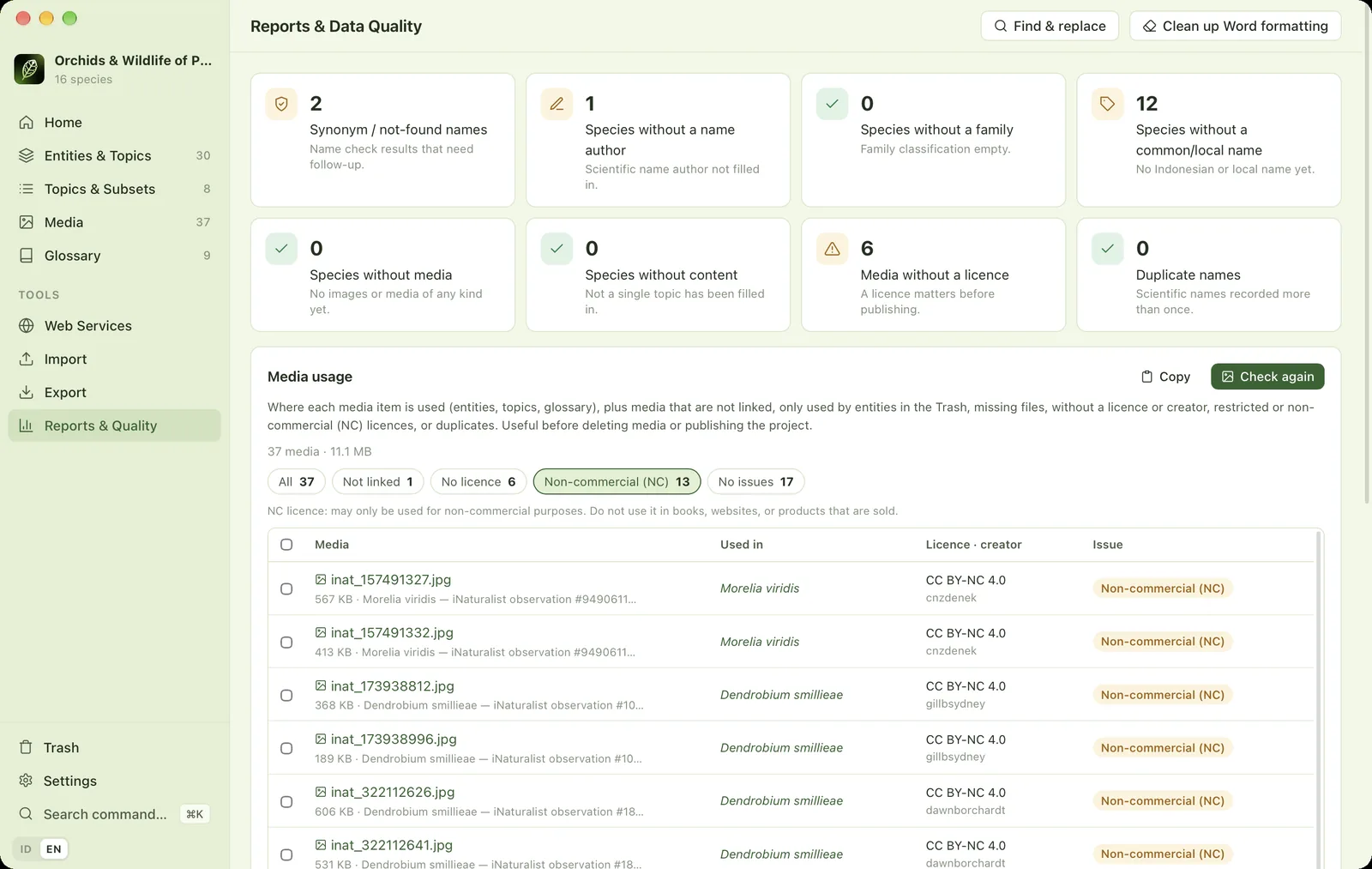
Writing correct attribution#
For BY licences, include at least: the title/caption (if any), the creator's name, the source (a link to the original page) and the licence (with a link to the licence text). Example:
Dendrobium smillieae. Photo: Jun MATSUI, via iNaturalist (observation #251998145), CC0 1.0.
The app fills in the creator, source and licence automatically for online photos. Do not remove them, and say so if you change a photo (cropping, adding a watermark). A watermark must not cover or replace the attribution.
Terms of each data source#
| Source | Licence & main terms |
|---|---|
| iNaturalist | Each photo and observation uses the licence chosen by its observer; many are CC BY-NC. iNaturalist asks API users to limit their request rate (about 1 per second) and not to download very large amounts of data through the API. For bulk data, use a GBIF export. The app pauses automatically. iNaturalist's terms of use also prohibit using its data to train commercial AI models. |
| GBIF | Data are subject to the GBIF Data User Agreement and each dataset's licence (CC0, CC BY or CC BY-NC). Credit the data publishers. For scientific publications GBIF recommends citing a DOI; create a download or derived dataset on GBIF.org to get one. |
| IUCN Red List (via GBIF) | Only the category code is stored and shown. Cite: IUCN. The IUCN Red List of Threatened Species with the version year. Commercial use of IUCN data requires IUCN's permission. |
| POWO / WCVP (Royal Botanic Gardens, Kew) | Kew data are generally licensed CC BY. WCVP on GBIF/ChecklistBank is CC BY 4.0. Citation: POWO ({year}). Plants of the World Online. Facilitated by the Royal Botanic Gardens, Kew. |
| WoRMS | CC BY 4.0. Citation: WoRMS Editorial Board ({year}). World Register of Marine Species. |
| Catalogue of Life | Mostly CC BY 4.0. Mention the checklist version used. |
| Wikipedia | Text is licensed CC BY-SA 4.0. The app adds attribution when it inserts a summary. Works containing that text must remain CC BY-SA. |
| Wikimedia Commons | Licence per file. The app only accepts free licences and stores their attribution. |
| Ministerial Regulation P.106/2018 | A legal regulation, free to quote. |
| CITES Appendices | May be reused with credit to the source (CITES Secretariat). The CITES logo is not used. |
| Base maps | OpenStreetMap: ODbL data, the "© OpenStreetMap contributors" attribution is required. GBIF maps: GBIF and OpenMapTiles attribution. TDWG WGSRPD boundaries (CC BY 4.0) and Natural Earth (public domain) are credited on every distribution map. |
Third-party terms can change at any time. Always check each source's official terms page.
Your own data#
Topic text, photos and data you create yourself remain yours. Set the project's data licence in Settings → This project → Data licence (e.g. CC BY 4.0), and fill in the licence of your own photos in Properties → Media.
Photo credits in the app#
The photos in the start-screen honeycomb collage and the Home banner are by Reza Saputra, all rights reserved, except the photos below, which are used under open licences that allow commercial use. They are scaled down and cropped to hexagons in display.
- Amorphophallus titanum, photo by Rhododendrites, CC BY-SA 4.0, via Wikimedia Commons
- Amphiprion percula, photo by Karelj, Public domain, via Wikimedia Commons
- Anaphalis javanica, photo by Sulingbambu, CC BY-SA 4.0, via Wikimedia Commons
- Babyrousa celebensis, photo by Masteraah, CC BY-SA 2.0 de, via Wikimedia Commons
- Birgus latro, photo by John Barkla, CC BY 4.0, via Wikimedia Commons
- Bubalus depressicornis, photo by The Land, CC BY-SA 3.0, via Wikimedia Commons
- Buceros rhinoceros, photo by Stefan Fussan, CC BY-SA 3.0, via Wikimedia Commons
- Carettochelys insculpta, photo by Aneta p, CC BY 4.0, via Wikimedia Commons
- Casuarius casuarius, photo by Cburnett, CC BY-SA 3.0, via Wikimedia Commons
- Chalcosoma atlas, photo by JohnSka, CC BY-SA 3.0, via Wikimedia Commons
- Chelonia mydas, photo by Brocken Inaglory, CC BY-SA 4.0, via Wikimedia Commons
- Chromodoris annae, photo by Diego Delso, CC BY-SA 4.0, via Wikimedia Commons
- Cicinnurus respublica, photo by JJ Harrison, CC BY-SA 4.0, via Wikimedia Commons
- Crocodylus porosus, photo by H. Zell, CC BY-SA 3.0, via Wikimedia Commons
- Dendrolagus sp., photo by Tim Williams, CC BY 2.0, via Wikimedia Commons
- Dicerorhinus sumatrensis, photo by Digedrun, CC BY-SA 4.0, via Wikimedia Commons
- Dugong dugon, photo by Julien Willem, CC BY-SA 3.0, via Wikimedia Commons
- Elephas maximus sumatranus, photo by Léodras, CC BY-SA 4.0, via Wikimedia Commons
- Eretmochelys imbricata, photo by Diego Delso, CC BY-SA 4.0, via Wikimedia Commons
- Goura victoria, photo by Roy Egloff, CC BY-SA 4.0, via Wikimedia Commons
- Helarctos malayanus, photo by Rushenb, CC BY-SA 4.0, via Wikimedia Commons
- Hippocampus bargibanti, photo by Steve Childs, CC BY 2.0, via Wikimedia Commons
- Hylobates moloch, photo by Hamas Fathani, CC BY-SA 4.0, via Wikimedia Commons
- Hymenopus coronatus, photo by Luc Viatour, CC BY-SA 3.0, via Wikimedia Commons
- Leucopsar rothschildi, photo by JJ Harrison, CC BY-SA 3.0, via Wikimedia Commons
- Macaca nigra, photo by Elrond, CC BY-SA 4.0, via Wikimedia Commons
- Macrocephalon maleo, photo by Ariefrahman, CC BY-SA 4.0, via Wikimedia Commons
- Melanotaenia boesemani, photo by H. Zell, CC BY-SA 3.0, via Wikimedia Commons
- Mobula birostris, photo by Arturo de Frias Marques, CC BY-SA 4.0, via Wikimedia Commons
- Myristica fragrans, photo by Terrence Coombes, CC BY-SA 4.0, via Wikimedia Commons
- Nasalis larvatus, photo by Charles J. Sharp, CC BY-SA 4.0, via Wikimedia Commons
- Nephila pilipes, photo by Timothy A. Gonsalves, CC BY-SA 4.0, via Wikimedia Commons
- Neurothemis fluctuans, photo by Charles J. Sharp, CC BY-SA 4.0, via Wikimedia Commons
- Nisaetus bartelsi, photo by EKO PRASTYO, CC BY-SA 4.0, via Wikimedia Commons
- Nycticebus coucang, photo by Aprisonsan, CC BY-SA 4.0, via Wikimedia Commons
- Nyctimystes infrafrenatus, photo by JJ Harrison, CC BY-SA 3.0, via Wikimedia Commons
- Odontodactylus scyllarus, photo by Jens Petersen, CC BY 2.5, via Wikimedia Commons
- Ornithoptera croesus, photo by Bernard DUPONT from FRANCE, CC BY-SA 2.0, via Wikimedia Commons
- Panthera tigris sondaica, photo by Clément Bardot, CC BY-SA 4.0, via Wikimedia Commons
- Phalaenopsis amabilis, photo by Orchi, CC BY-SA 3.0, via Wikimedia Commons
- Phallus indusiatus, photo by Ajaykuyiloor, CC BY-SA 3.0, via Wikimedia Commons
- Pongo pygmaeus, photo by Ridwan0810, CC BY-SA 4.0, via Wikimedia Commons
- Pterapogon kauderni, photo by Pharaoh Hound, CC BY 2.5, via Wikimedia Commons
- Rafflesia arnoldii, photo by Maizal Chaniago, CC BY-SA 4.0, via Wikimedia Commons
- Rhacophorus nigropalmatus, photo by Rushenb, CC BY-SA 4.0, via Wikimedia Commons
- Rhacophorus reinwardtii, photo by Farras Firdaus, CC BY-SA 4.0, via Wikimedia Commons
- Rhincodon typus, photo by Arturo de Frias Marques, CC BY-SA 4.0, via Wikimedia Commons
- Synchiropus splendidus, photo by Luc Viatour, CC BY-SA 3.0, via Wikimedia Commons
- Tarsius spectrumgurskyae, photo by Meldy Tamenge, CC BY-SA 4.0, via Wikimedia Commons
- Trogonoptera brookiana, photo by Vyacheslav Argenberg, CC BY 4.0, via Wikimedia Commons
- Varanus komodoensis, photo by Jakub Hałun, CC BY 4.0, via Wikimedia Commons
a.jpg)


,_Anilao,_Filipinas,_2023-08-22,_DD_53.jpg)


,_islas_Ad_Dimaniyat,_Om%C3%A1n,_2024-08-13,_DD_69.jpg)


.jpg)


.JPG)


_male_Labuk_Bay_2.jpg)

_male_Phuket_2.jpg)


_male_(8361987460).jpg)


The app's licence#
Use of the Pustaka Biodiversitas app is governed by the End User Licence Agreement. The fonts bundled in the website templates (Lato, Playfair Display) are licensed under the SIL Open Font License 1.1.